System Requirements
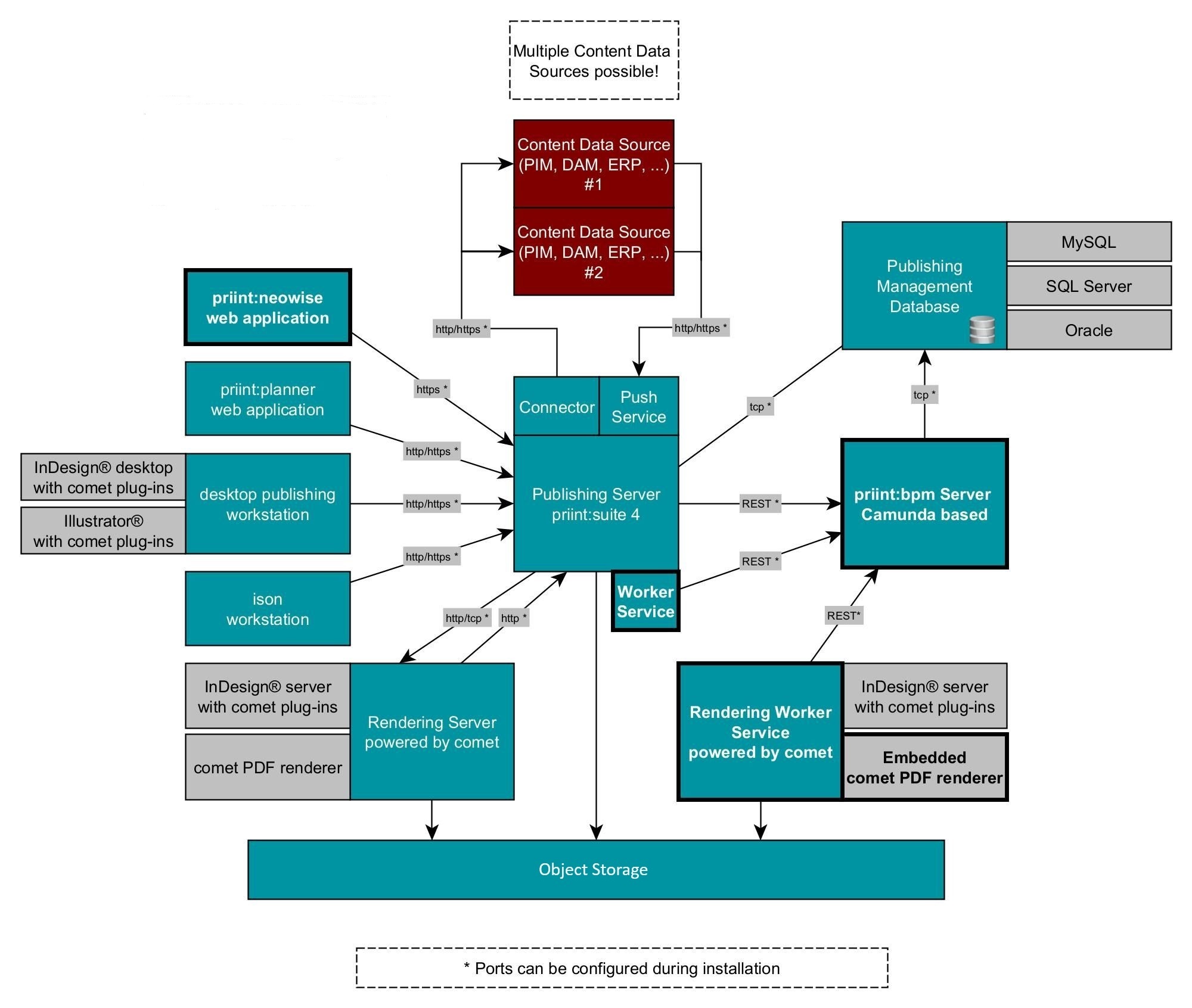
| priint:publishing server | |
| Computer/CPU: | Multicore-Processor (x64) ≥ 4 Core per 20 concurrent users or 5 parallel server jobs 1 core¹ |
| Operating system: | Windows Server 2016, Windows Server 2019, Windows Server 2022 |
| Linux Ubuntu 22.04 LTS, Linux Ubuntu 24.04.2 LTS | |
| No Mac OS | |
| RAM: | 8 GB RAM additional per 5 concurrent users or 2 server jobs 1 GB RAM optionally additional RAM for entity cache¹ |
| Hard disk space: | 8 GB hard disk space for installation¹ |
| Display: | 16-Bit-display adapter or higher, resolution 1024 x 768 or higher |
| Software: | If using the included MySQL and Windows, "Visual C++ Redistributable Package" must be installed. Java 11 must be installed. |
| Network card: | 1 Gbit/s duplex, http(s) REST, optionally additional network cards with 1 Gbit/s for connections to data sources |
| The publishing:server is the application server of the print:suite 4 and should be reachable for the client workstations via http(s). The publishing:server needs access to the content delivery systems using the required protocol. In addition please also look at priint:bpm server, publishing:management database, publishing:management file server. Java 17 is used. | |
¹ The project specific requirement might vary depending on complexity of publications and work flows.
| priint:bpm server | |
| Computer/CPU: | Multicore-Processor (x86, x64) |
| Operating system: | Windows Server 2016, Windows Server 2019, Windows Server 2022 |
| Linux Ubuntu 22.04 LTS, Linux Ubuntu 24.04 LTS | |
| No Mac OS | |
| RAM: | 4 GB RAM |
| Hard disk space: | 8 GB hard disk space for installation¹ |
| Software: | If priint:bpm server is installed on an different machine than priint:publishing server, Java 17 must be installed. |
| Network card: | 1 Gbit/s duplex |
¹ The project specific requirement might vary depending on complexity of publications and processes.
| publishing:management database | |
| Computer/CPU: | Multicore-Processor (x86, x64) |
| Operating system: | as required by the database management system |
| RAM: | 4 GB RAM |
| Hard disk space: | 8 GB hard disk space for installation, additionally space for the database instance¹ |
| Software: | Supported database management systems: Microsoft SQL Server 2016, 2019 Oracle 11g, Oracle 12c, Oracle 19c, Oracle 21c, Oracle 23c, MySQL 8 |
| Network card: | 1 Gbit/s duplex |
| Please also be aware of the system requirements of the database system itself. If publishing:management database is installed on the same computer as publishing:server, macOS is not supported. | |
¹ The project specific requirement might vary depending on content data sizing.
| publishing:management file server | |
| General requirements as publishing:server, additionally: | |
| RAM | + 1 GB RAM |
| Hard disk space: | Hard disk size: The needed hard disk space is depending on the amount of saved layout documents (InDesign® documents, PDF documents) and their average size. Calculation formula: Initial size + ø amount x ø size of layout documents x growth per year (1.x) x 1.3 (Overhead, e.g. meta data) 10 GB + 1000 x 0.125 GB x 1.1 x 1.3 = 193 GB / year |
| Network card: | 1 Gbit/s duplex |
| Object Storage (MinIO) | |
| These requirements are for development and testing only. There are many installation variants for production environments. Please check MinIO requirements on: https://min.io/docs/minio/windows/operations/checklists/hardware.html | |
| Computer/CPU | Multicore-Processor (x64) minimum 4 Cores |
| Operating system | Recommended: Ubuntu 22.04 LTS operating system, Windows |
| RAM | 8GB |
| Hard disk space | 100GB |
| Network bandwidth | 1GB/s minimum network bandwidth |
| rendering:server and rendering worker service with Adobe InDesign® Server | ||
| Computer/CPU: | Multicore-Processor (x64) or Apple Silicon M1 | Supported OS and hardware for the rendering:server with Adobe InDesign® Server are dictated by the Adobe InDesign® Servers requirements. See the link below for details. |
| Operating system: | Windows | |
| Mac OS X 10.13 or higher | ||
| Ubuntu 22.04/24.04 LTS (only Rendering Worker) | ||
| RAM: | 12 GB RAM, additionally 2 – 4 GB per Adobe InDesign® Server instance | |
| Hard disk space: | 10 GB hard disk space for installation additionally, 2 GB per InDesign® Server instance for virtual memory swap file | |
| Display: | 16-Bit-display adapter or higher, resolution 1024 x 768 or higher | |
| Software: | Adobe InDesign® Server limited, multi-instance, for neowise and priint:bpm at least two instances are needed.
comet 4.3: Adobe InDesign® Server 2022 - 2024. Server 2022 sub-version 17.2 is needed at least! Generally there will be support for the last three versions of Adobe InDesign®. Usually shortly after the general availability of a new version it will be supported. Java 17 must be installed for rendering worker service. Adobe InDesign® Server and rendering worker service can be installed as well on two different machines, for example rendering worker service with priint:publishing server or/and priint:bpm server on one machine, and Adobe InDesign® Server on another. ODBC and ODBC Connector(s): When using ODBC data sources through Adobe InDesign® Server, ODBC and appropriate ODBC connectors must be installed. Mac OS X 10.13 and Higher: If you want Adobe InDesign® Server to run Python scripts, you must have Python 3.8 installed at the default path /Library/Frameworks. Please note: The plug-ins can also be started without this Python installation. Python scripts are then terminated with an error. Mac OS 12 and Higher : If you are using the universal (Intel and Apple Silicon) plug-ins and want Adobe InDesign® Server to run Python scripts, you must have Python 3.10 installed at the default path /Library/Frameworks. Please note: Universal plug-ins are available only for InDesign® Server 2022/2023/2024. The plug-ins can also be started without this Python installation. Python scripts are then terminated with an error. | |
| Network card: | 1 Gbit/s duplex | |
| Additionally, the system requirements of the used Adobe InDesign® Server version is applicable. See https://helpx.adobe.com/indesign/kb/system-requirements-indesign-server.html for detail information. | ||
| rendering:server and rendering worker service with priint:comet pdf renderer | |
| Computer/CPU: | Multicore-Processor (x86, x64) or Apple Silicon M1 |
| Operating system: | Windows Server 2016, Windows Server 2019, Windows Server 2022 |
| Mac OS X 10.13 or higher | |
| Linux Ubuntu 22.04/24.04 LTS | |
| RAM: | 4 GB RAM, additionally 1-3 GB per priint:comet pdf renderer instance |
| Hard disk space: | 2 GB hard disk space for installation |
| Display: | 16-Bit-display adapter or higher, resolution 1024 x 768 or higher |
| Software: | PDFlib 10.0.0 is needed for rendering worker service for each operation system, 9.0.4, 9.0.6, 9.1.2, 9.2.0, 9.3.1 or 10.0.0 is needed for priint:comet pdf renderer.
ODBC and ODBC Connector(s) : When using ODBC data sources through comet_pdf, ODBC and appropriate ODBC connectors must be installed.
Mac OS Only: If you want comet_pdf to run Python scripts, you must have Python 3.10 installed at the default path /Library/Frameworks. Please note: comet_pdf can also be started without this Python installation. Python scripts are then terminated with an error.
Other required software is included in the installation package. |
| Network card: | 1 Gbit/s duplex |
| The priint:comet pdf renderer is available in priint:suite 4.1 and higher.The rendering worker service supports maximum four priint:comet pdf renderer instances. If more instances are required, more instances of the rendering worker service can be installed, on one or more machines. Please contact sales department for license questions. | |
| Web application (priint:planner and/or priint:neowise) | |
| Computer/CPU: | Windows: Multicore-Processor (x86, x64) |
| Mac OS: Intel multi core processor or Apple Silicon M1 | |
| Operating system: | Windows 10, Windows 11 |
| Mac OS X 10.8 or higher | |
| RAM: | 2 GB RAM (4 GB recommended) |
| Hard disk space: | ~ 500 MB hard disk space for temporary files |
| Display: | 16-Bit-display adapter or higher, resolution 1280 x 1024 or higher, recommended Full HD, 4K is not supported. |
| Software: |
Windows: Current version of Mozilla Firefox / Google Chrome / Microsoft Edge |
| macOS: Current version of Mozilla Firefox / Google Chrome / Apple Safari | |
| Network: | LAN: 10 Mbit/s duplex; recommended: 100 Mbit/s duplex or higher WAN: 4 Mbit/s asynchronous; recommended: 16 Mbit/s synchronous or higher |
| DTP workstation with Adobe InDesign® desktop | |
| Computer/CPU: | Windows: Multicore-Processor (x86, x64) |
| macOS: Intel Multicore-Processor or Apple Silicon M1 | |
| Operating system: | as required by the used Adobe InDesign® version, see below |
| RAM: | 4 GB RAM (16 GB recommended) |
| Hard disk space: | ~ 5 GB hard disk space for plugin installation and temporary files |
| Display: | 32-Bit-display adapter or higher, resolution 1280 x 1024 or higher, recommended Full HD |
| Software: | comet 5.0: Adobe InDesign® 2022 - 2024. For InDesign® 2022 sub-version 17.4.2 is needed at least! But we strongly recommend to use version 19.2
ODBC and ODBC Connector(s) : When using ODBC data sources through Adobe InDesign®, ODBC and appropriate ODBC connectors must be installed. Mac OS X 10.13 and Higher : If you want Adobe InDesign® to run Python scripts, you must have Python 3.8 installed at the default path /Library/Frameworks. Please note: The plug-ins can also be started without this Python installation. Python scripts are then terminated with an error. Mac OS 12 and Higher : If you are using the universal (Intel and Apple Silicon) plug-ins and want Adobe InDesign® to run Python scripts, you must have Python 3.10 installed at the default path /Library/Frameworks. Please note: Universal plug-ins are available only for InDesign® 2022/2023/2024. The plug-ins can also be started without this Python installation. Python scripts are then terminated with an error. |
| Network: | LAN: 100 Mbit/s duplex or higher WAN: 16 Mbit/s asynchronous; recommended: 32 Mbit/s synchronous or higher |
| If workstations are connected over WAN, it is recommended to replicate the image data locally in the workstation network. Additionally, the system requirements of the used Adobe InDesign® version are applicable, see https://helpx.adobe.com/indesign/system-requirements.html. | |
| Designer workstation with Adobe Illustrator® | |
| Computer/CPU: | Windows: Multicore-Processor (x86, x64) |
| macOS: Intel Multicore-Processor or Apple Silicon M1 | |
| Operating system: | as required by the used Adobe Illustrator® version |
| RAM: | 8 GB RAM (16 GB recommended) |
| Hard disk space: | ~ 5 GB hard disk space for plugin installation and temporary files |
| Display: | 32-Bit-display adapter or higher, resolution 1280 x 1024 or higher, recommended Full HD |
| Software: | Adobe Illustrator®2022 - 2024 comet 5.0: Adobe Illustrator® 2022 - 2024. ODBC and ODBC Connector(s) : When using ODBC data sources through Adobe Illustrator®, ODBC and appropriate ODBC connectors must be installed. Mac OS X 10.13 and Higher : If you want Adobe Illustrator® to run Python scripts, you must have Python 3.10 installed at the default path /Library/Frameworks. Please note: Universal plug-ins are available only for Illustrator® 2022. The plug-ins can also be started without this Python installation. Python scripts are then terminated with an error. |
| Network: | LAN: 100 Mbit/s duplex or higher WAN: 16 Mbit/s asynchronous; recommended: 32 Mbit/s synchronous or higher |
| If workstations are connected over WAN, it is recommended to replicate the image data locally in the workstation network. Additionally, the system requirements of the used Adobe Illustrator® version are applicable. | |
| ISON | |
| Computer/CPU: | Windows: Intel Multicore-Processor, x86 or x64 Processor (32-bit, 64-bit) |
| Operating system: | Windows 10, Windows 11 or any Windows server supported by priint:publishing server |
| RAM: | 4 GB RAM |
| Hard disk space: | ~ 2 GB hard disk space for installation |
| Display: | 16-Bit-display adapter or higher, resolution 1280 x 1024 or higher, recommended Full HD |
| Software: | Eclipse 2023-03 Java 17 embedded in Eclipse |
| Network: | LAN: 100 Mbit/s duplex or higher WAN: 16 Mbit/s asynchronous; recommended: 32 Mbit/s synchronous or higher |
The article describes the requirements for the current versions of priint software. For requirements of older versions please contact support@priint.com.