Publishing Server - Additional installation options
1. Installation by Command Line
Installation can also be called by command line as follows:
$priint_path\update\bin\silent-install.bat <installation-settings-file>
installation-settings-file is an XML file containing all necessary property settings to run an installation of publishing server. In fact the wizard based installation will write a file $priint\_path\\etc\\settings.install.xml and execute it this way.
Typical use case for the command line based installation is either to run unattended installations or to use special installation options not available through the wizard.
1.1. How to use command line installer
If you want to use the command line tool yourself the following approach is strongly recommended:
- Start wizard based installation and complete all pages
- On last page do not click the "Install" button but click "Save" to save the installation configuration to disk.
- Open the file settings.install.xml in a text editor and modify it according to your needs.
- Run the command line tool using your modified file.
2. Default Credentials
Default credentials can be found here: https://kb.priint.com/index.php/article/default-passwords/
3. Network Ports
Since you may use priint:publishing hub developer stack together with other web development projects, we do not use the default ports for the difference services like Glassfish, MySQL or Apache. Since we are developing for the output system priint:comet no 4, we transferred all ports into the 40.000 region, so prefixed with 4 (or 40 or 400).
| Server | Service Name | Default | Pubserver | Comment |
|---|---|---|---|---|
| Local MySQL Database | mysql demon | 3306 | 43306 | |
| Payara Server | http admin_listener | 4848 | 40048 | |
| http_listener | 8080 | 40080 | ||
| https_listener | 8181 | 40081 | Not configured by default. Needs a valid certificate when used in production. | |
| http_comet_listener | 40082 | |||
| debugger | 9009 | 40009 | Only running if Payara was started with option "--debug". | |
| Hazelcast / Cache | 5900 | 40049 |
4. Additional Installer Options
The following options can be used in settings.install.xml to control a new installation or in settings.local.bat to control an already existing installation.
4.1. Path to local database installation
Used if database server is on local machine (same machine as Payara). DBPath points to directory where database (or database tools) are installed. Typically:
SET DBPath=%DevstackPath%databaseMySQL
4.2. Address of Database Server
Remote address and port of database server.
SET DBHost=localhost
SET DBPort=43306
4.3. Credentials of Database Root User
Credentials are used in combination scripts that need root access to local database. Especially start/stop database server, create new database or user. Not used in remote database installations.
SET DBAdminUser=sa
SET DBAdminPassword=changeme
4.4. Credentials of Database User for Payara Access
Database account credentials to connect to databases from Payara. This password will be stored in plain text in settings.local.bat as well as in domain.xml of Payara domain.
SET DBUser=priintadmin
SET DBPassword=changeme
4.5. Local MySQL Settings
MySQLService variable contains name of MySQL Service for Windows.Setting MySQLService to an empty string means run as user application and not as Windows service.
You can set MySQL credentials explicitly and thereby overwriting DBUser, DBPassword, etc. This is useful in situations in scenarios with more than one RDBMS. E.g. when the local MySQL is used for PubServerKernel database and PublishingHubDB is run from an MSSQL server configured via DBType, DBUser etc. The default credentials can be found here: https://kb.priint.com/index.php/article/default-passwords/;
SET MySQLService=PubServer\_MySQL

SET MySQLUser=<password>
SET MySQLPassword=<password>
SET MySQLAdminUser=<password>
SET MySQLAdminPassword=<password>
4.6. Specific Database Settings
Each database can be set to individual settings.The setting names are constructed by: DB + <Setting> + <DatabaseUnit>. Settings are Type, Database, User, Password, AdminUser, AdminPassword, Instance, Host, Port. DatabaseUnits are PubServerKernel, PublishingHubDB, Comet4Admin, Comet4Data, Comet4Import. PublishingHubDB and Comet4Data can have several instances, The instances are numbered in sequence, e.g. PublishingHubDB, PublishingHubDB2, PublishingHubDB3, etc.
Example 1: Special settings adding two more comet data database.
SET DBDatabaseComet4Data2=priint\_comet\_data2
SET DBDatabaseComet4Data3=priint\_comet\_data3
Example 2: Special settings first PublishingHubDB database.
SET DBTypePublishingHubDB=MSSQL
SET DBDatabasePublishingHubDB=test\_PublishingHubDB
SET DBHostPublishingHubDB=dbserver03
SET DBPortPublishingHubDB=
SET DBInstancePublishingHubDB=test\_inst
SET DBUserPublishingHubDB=testuser
SET DBPasswordPublishingHubDB=\*\*\*\*\*\*
4.7. Payara Settings
GlassfishService variable contains the name of the Payara Service for Windows. Setting GlassfishService to an empty string means run as user application and not as Windows service.
GlassfishPortBase is only used when creating a domain from scratch during installation. For Payara default ports (8080 and 4848) set port base to empty string.
Glassfish admin credentials are copied to glassfish3.password.txt that is used in the starting process of Glassfish and for all other administrative tasks.
GlassfishDomainName is set to "pubserver". Do not change this setting. Default credentials can be found here: https://kb.priint.com/index.php/article/default-passwords/
SET GlassfishService=PubServer\_Glassfish
SET GlassfishPortBase=40000
SET GlassfishHttpPort=40080
SET GlassfishHttpsPort=40081
SET GlassfishAdminPort=40048
SET GlassfishUser=put_default_user_here
SET GlassfishPassword=put_default_password_here
SET GlassfishDomainName=pubserver
4.8. Credentials for Publishing Server
Admin user credentials used for publishing server and ison. These values will be used from the devstack update process, when checking-in files into the repository.
If you want to change this please read Section "Changing Password of publishing server Admin User". Default credentials can be found here: https://kb.priint.com/index.php/article/default-passwords/
SET PubserverUser=put_default_user_here
SET PubserverPassword=put_default_password_here
4.9. Using ison in a multi-user environment
If different users may work concurrently with ison on the same machine you should modify the default workspace location. Please open settings.local.bat and add the line:
SET WorkspacePath=%UserProfile%ison-Workspace
5. Manual Installation of Databases
Manual installation of databases is required when using remote databases. This is typically a job of the database administrator of your organization.
Databases and db users have to be created BEFORE executing the Pubserver installation or update process.
Use the database tool of your choice (e.g. "MySQL Workbench" or "SQLDeveloper Studio"). Connect to your database server using root user ("root" on MySQL, "sa" on MSSQL).
Database scripts can be generated by the installation wizard: Say Download SQL" on the database tab. It will compile all needed SQL scripts into one file using the settings of the dialog.
Database scripts can also be executed from base file in the installation package: In each update package you will find a folder containing database administration SQL scripts. E.g. "database<DBTYPE>data".
For each database you need please execute the "install" and the "create" and "initialdata" scripts: Here an example using SQLSERVER and PubServerKernel database.
- Adding the database and user
- execute
..install.sqle.g.PubServerKernel.MSSQL.install.sql
- execute
- Adding the database schema and initial data
- execute
..create.sqland..initialdata.sqle.g.PubServerKernel.MSSQL.create.sqlPubServerKernel.MSSQL.initialdata.sql
- execute
- Change Password for "priintadmin"
- Scripts contain hard coded user name and password (https://kb.priint.com/index.php/article/default-passwords/). Change password according to your needs. Different database tools have different ways to do this.
Have in mind, that later updates to the database again may require help from your database admin.
6. Running Payara and MySQL as Windows Service
If the variables GlassfishService and MySQLService in settings.local.bat are set to empty strings this means that applications will run in normal user mode. This is the default settings.
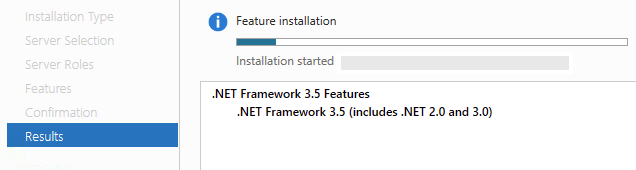
Important: Payara Service starter requires .NET Framework 3.5. This is not installed per default on Windows 2012 Servers. You will have to install it as a Feature (see https://technet.microsoft.com/en-us/library/dn482071.aspx for Details)
Screenshot of .NET 3.5 Installation on Windows 2012
After you have ensured that .NET 3.5 is installed on your system you can install Payara and MySQL as Windows service:
-
Do a default installation and check everything in user application mode first
-
Stop the publishing server (Glassfish and MySQL)
-
Add the following to
settings.local.batSET GlassfishService=PubServer_GlassfishSET MySQLService=PubServer_MySQL
-
Run the following batch scripts from folder
/etcwith admin privilegesglassfish3.service.create.batThis will setup the Windows service and add a system environmental variableAS_JAVA(see note on JDK)mysql.service.create.bat
Skip MySQL parts if you don't need MySQL.
Services are established in a simple way using .LocalSystem as user and no restrictive file permissions. If this does not fit the security policies of you organization you should change it accordingly.
Note on JDK Payara uses the system environment variable AS_JAVA to get the location of JDK if run as service. This is set by glassfish3.service.create.bat automatically to the devstack JDK. You can use this variable to point to another JDK version on your system. This can be helpful if you have implemented a organization wide policy for JDK updates. But be aware that WERK II does not necessarily test every JDK version provided by Oracle.
Note on Uninstall To un-install Payara and MySQL as Windows service:
- Stop the publishing server (Payara and MySQL)
- Run the following batch scripts from folder
/etcwith admin privilegesglassfish3.service.remove.batThis will remove the Windows service and optionally removes the system environmental variableAS_JAVA(see note on JDK)mysql.service.remove.bat
- Add the following to
settings.local.batSET GlassfishService=
SET MySQLService=