Change log level of publishing server
1 Introduction
The publishing server uses the logback framework for logging. logback uses a configuration file to control the log level. There is an entry for the root log level. For each package or class a separate log level setting is possible.
The configuration file is found in your-pubservers-folder/glassfish/domains/pubserver/config/logback.xml. If you use PStart, you can edit this file from it:
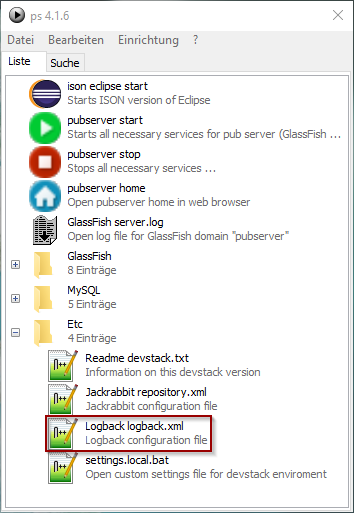
The file contains XML. It might look similar to this:
<?xml version="1.0" encoding="UTF-8"?>
<!--
Vendor:  WERK II GmbH Duisburg Germany «www.priint.com»
Product: priint:suite 4 - Publishing Server
...
You may execute "asadmin -Dlogback.configurationFile=file\:///${com.sun.aas.instanceRoot}/config/logback.xml".
-->
<configuration debug="true" scan="true" scanPeriod="60 seconds">
    <appender name="STDOUT" class="ch.qos.logback.core.ConsoleAppender">
        <encoder>
            <pattern>%d{HH:mm:ss.SSS}|%thread|%-5level|%logger{48}|%X{HOST}|%X{SESSION}|%X{USER}|%X{REQUEST}|%msg</pattern>
        </encoder>
    </appender>
    <logger name="org.apache" level="INFO">
        <!-- excluding jackrabbit and shiro debug and trace messaging -->
    </logger>
    <logger name="net.sf.ehcache" level="INFO">
        <!-- excluding ehcache debug and trace messaging -->
    </logger>
    <!-- during development it is recommended to log the classes under construction on level ALL, e.g.
         <logger name="com.priint.pubserver.plugins.datamapping.demo" level="ALL" />
    -->
    <root level="DEBUG">
        <appender-ref ref="STDOUT" />
    </root>
</configuration>
The root level is set quite at the end of the file in<root level="DEBUG">. Change DEBUG to INFO for little logging or WARNING for even less logging.
Please do not change anything else except adding further <logger> elements for classes or packages for their analysis. Some examples are:
<logger name="com.kontoso.pubserver.plugins" level="ALL" />
Sets logging to include all messages written at all levels for all classes in the package structure com.kontoso.pubserver.plugins.
<logger name="com.kontoso.pubserver.plugins.datamapping.HorizontalTable" level="ALL" />
Sets logging for the class HorizontalTable to include all messages written at all levels.
The file is automatically read every 60 seconds, so the change is active without a restart of publishing server. The log behavior will change in the next minute.
2 Logging in Java Code
Here you see some example code how you should dologging in your Java code.
import org.slf4j.Logger;
import org.slf4j.LoggerFactory;

public class MyExampleClass {

private static final Logger LOGGER = LoggerFactory.getLogger(MyExampleClass .class);

public void myExampleMethod() {

   LOGGER.error("A severe problem occurred.");
   LOGGER.warn("This issue might be a problem, keep track of it.");
   LOGGER.info("This incident is worth being noted.");
   LOGGER.debug("During implementation and testing we need to know this.");
   LOGGER.trace("Very detailed information just needed in detail analysis.");

}
Variable values might be added in this way to the logging:
LOGGER.debug("getRealGridElementDimensions identifier={} entityId={} left={} top={} right={} bottom={}",
planningId, entityId, result.get(0),result.get(1),result.get(2),result.get(3));